Companion Screen for Mixxx
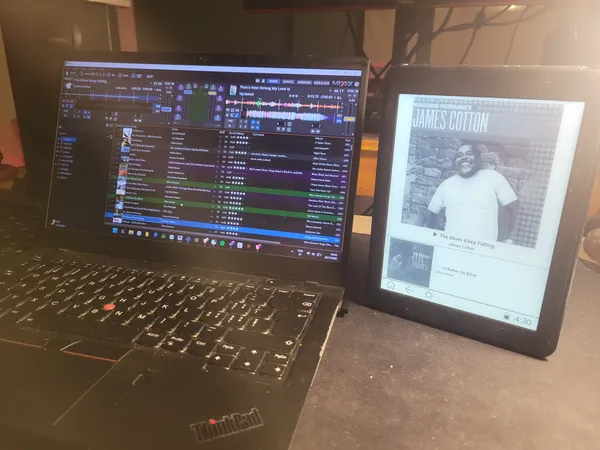
Mixxx Remote Display brings music discovery to the dance floor.
This wireless "Now Playing" screen helps dancers identify tracks and artists without interrupting the DJ. It works on any Android device using Bluetooth.
Lowering the friction of music discovery
When someone hears a song they love at a social dance—be it a Lindy Hop set, a Tango milonga, or a Salsa night—they often forget to ask the DJ about it later. I built this app to close that gap. It provides a passive way for people to learn about the music without breaking the social flow of the party.
The app works on any Android phone or tablet. It is particularly useful for partner dance DJs (Swing, Blues, Salsa, Bachata, Forró) who focus on track curation. By using Bluetooth, the display can be placed anywhere in the venue without relying on the local Wi-Fi.
Capabilities
Bluetooth Connectivity
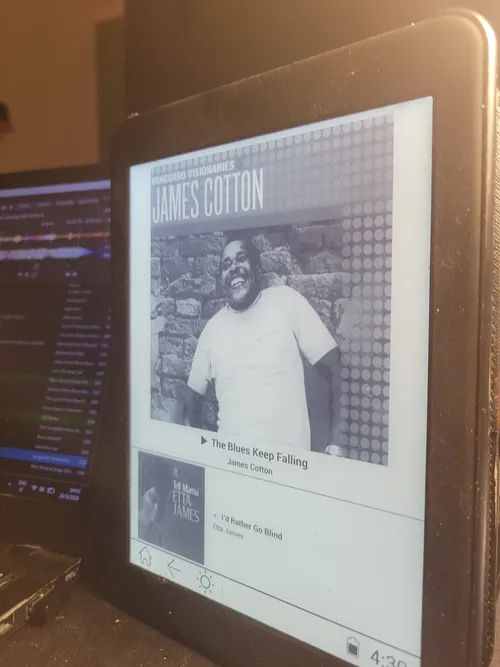
Uses Bluetooth SPP (RFCOMM) for a direct link to the DJ laptop. No internet or router required, ensuring reliability in any venue.
Lightweight and Efficient
Tuned to send minimal data. It receives pre-resized cover art and metadata, keeping the connection fast even on 10-year-old hardware.
Built for low-end devices
Runs smoothly on older Android phones, tablets, and e-readers. Built-in hardware refresh modes prevent ghosting on E-ink screens, making it a perfect high-contrast display for dance booths.
Automatic Song Tracking
The DJ starts the broadcast once. The display then tracks every song change from Mixxx automatically throughout the night.
How it works
A lightweight architecture designed to bridge the DJ booth and the dance floor without internet dependencies.
Broadcast
Mixxx DJ Buddy running on the DJ laptop monitors live track changes and extracts album artwork metadata.
Stream
The laptop transcodes and resizes the image bytes. It then pushes metadata and artwork packets over a secure Bluetooth SPP link.
Render
The Android companion client receives the lightweight packet, paints the screen, and triggers custom E-ink refresh cycles.
Getting Started
- 01
Deploy the APK
Install the client app on any Android device (minimum Android 4.2.2).
- 02
Pair Devices
Establish a standard Bluetooth pairing between the Android display and the DJ laptop.
- 03
Run DJ Buddy
Launch the Mixxx DJ Buddy server script on your laptop and toggle the Bluetooth broadcast.
- 04
Place & Display
Launch the client app, select the paired laptop, and place the screen in the venue.
Technical Stack
By moving high-overhead tasks like image resizing and format conversion to the host laptop, the Android client remains light enough to run smoothly on legacy hardware.
Explore the full picture
Mixxx Remote Display is part of a larger ecosystem of tools built for social dance events.
Mixxx DJ Buddy
The desktop engine powering this remote display. It tracks your live BPM flow, monitors crate categories, and provides the Bluetooth transmitter.
View host app →DJ Set Analysis Dashboard
An interactive Python/Dash web app showing the complete history of Alexis's DJ sets under the persona Dr. Beat. Analyze BPM curves, song transitions, and long-term track choices.
Open dashboard →Dr. Beat: Swing & Jazz Sets
Curious to hear the actual music that inspired these projects? Explore the playlists and live set archives that Dr. Beat curates for social dancers.
Listen to sets →