Power BI · Custom Visual
The Text Card Grid
Qualitative data needs structure. This free Power BI custom visual organizes tabular text rows into readable, responsive card grids, timelines, and split readers.
⬇ Download on GitHub View Source Code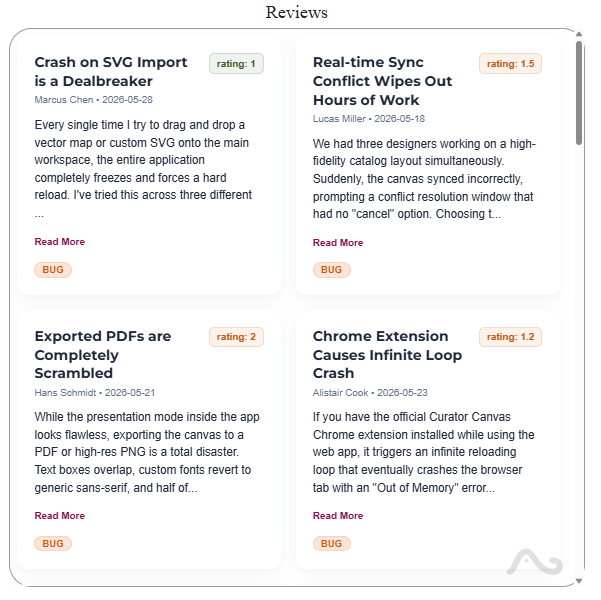
Click to zoom. Text Card Grid presentation layout.
Bridge numbers and narrative text
Power BI handles quantitative charts well but struggles with qualitative datasets like customer feedback, logs, and product notes.
The Text Card Grid visual addresses this gap. It reads raw text fields and restructures them into formatted card containers.
- Cards adapt to the canvas width, dynamically switching layout configurations.
- The visual supports custom grid alignments, chronological timeline streams, and split readers.
- Insignias and metric labels display alongside the main narrative.
- Paragraph spacing, lists, and formatting from the source data remain intact.
Visual integration
This visual is built with the TypeScript Power BI SDK. Re-engineering the rendering pipeline allows it to hook directly into the native formatting pane. You can adjust colors, fonts, border radii, and metric labels to match your dashboard theme.
Key features
Narrative comments
Displays feedback, changelogs, and notes in clear, structured card containers.
Layout controls
Transitions between responsive column grids, vertical timelines, or reader panes.
Metric overlays
Adds quantitative tags and status labels alongside qualitative text blocks.
Cross filtering
Updates other dashboard components instantly when you select a card.
Formatting options
Controls card spacing, background fills, text fonts, and border styles.
Open source
MIT licensed. The pbiviz package and complete source are open and free.
Download and installation
Obtain the compiled package from the GitHub repository to insert the visual into your reports.
GitHub Power BI Visuals Repository
Contains the TypeScript source code, capabilities JSON, and compiled files for the Text Card Grid. Clone the repo or download the release assets.
View Repository and ReleasesLooker Studio Version
Explore the Looker Studio edition of this visual, check its documentation, and test the embedded dashboard.
See Looker Studio Version →Install in 60 seconds
- Visit the PowerBI-viz GitHub Repository.
- Download the compiled
textCardGrid.pbivizpackage. - Open Power BI Desktop.
- In the Visualizations pane, select the three-dot menu icon and choose **Import a visual from a file**.
- Locate the
.pbivizfile and approve the security check. - Select the Text Card Grid icon, drag it to the canvas, and map your text columns.
More custom visualizations
Explore Other Visuals
Explore other custom visuals like the Intensity Matrix Heatmap and the Lipstick Bullet Chart built for Power BI.
See All Power BI Visuals →